

Best FreeCell Games to Play in 2026
FreeCell is a classic card game that has been enjoyed by computer users for many years. It belongs to the Solitaire family, but it plays differently from traditional Solitaire.
One of the main things that makes FreeCell special is that you can see all of the cards from the beginning. This makes planning your moves an important part of the game.
Today, you can play FreeCell on a computer, phone, or tablet. Some games focus on the classic rules, while others add features such as daily challenges, achievements, statistics, and saved games.
Here are five FreeCell games and game types to consider in 2026.
What Is FreeCell?
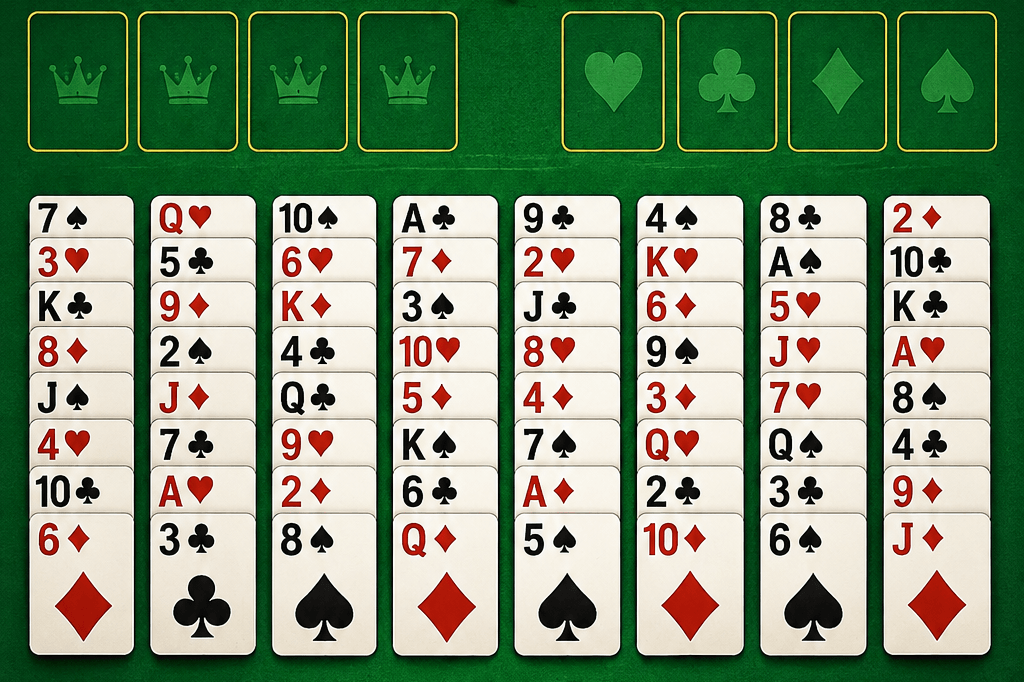
FreeCell is a single-player card game played with a standard deck of 52 cards. The cards are dealt face up into eight columns, so you can see every card at the start of the game.
At the top of the game are four empty spaces called free cells. You can use these spaces to temporarily hold individual cards while you move other cards around.
There are also four foundation piles. The goal is to move all 52 cards to these piles, building each suit from Ace to King.
On the main board, cards are placed in descending order and must alternate between red and black suits. For example, you can place a red 7 on a black 8.
The four free cells give you extra space for moving cards. However, each free cell can hold only one card.
Empty columns can also become useful. They give you more room to reorganize the cards and move larger groups.
Because all the cards are visible, FreeCell is mainly about planning your moves and deciding what to move first.
5 Best FreeCell Games
1. FreeCell Queen
FreeCell Queen is a modern way to play FreeCell online directly in your web browser.
The game works on desktop computers, phones, and tablets. The website also states that you do not need to download the game or create an account to play.
FreeCell Queen adds several features to the traditional FreeCell experience:
- Daily challenges
- Achievements
- Game statistics
- Automatic game saving
- Undo
- Hints
- Customizable game settings
The statistics show information such as games played, games won, win percentage, current streak, best streak, average time, best time, and average moves.
The Daily Challenge gives players a specific game to complete each day. This gives regular players an easy way to add a daily goal to their FreeCell routine.
Achievements provide another way to track progress. Instead of only trying to win individual games, players can work toward longer-term milestones.
The game also includes automatic saving. If you need to leave before finishing a game, you can return later and continue from where you stopped.
FreeCell Queen also lets players change settings such as animations, sound, card backs, backgrounds, and automatic moves to the foundations.
For players who want the classic FreeCell game with modern features, FreeCell Queen is a convenient option.
2. Microsoft FreeCell
Microsoft FreeCell is one of the best-known versions of the game.
FreeCell became especially familiar to computer users because it was included with Windows for many years. Microsoft continues to offer FreeCell as part of its Solitaire collection.
The Microsoft version follows the familiar FreeCell rules. You move cards between the eight columns, use the four free cells for temporary storage, and build four foundation piles.
One of its biggest advantages is familiarity. If you played FreeCell on a Windows computer in the past, the basic game will feel recognizable.
Microsoft Solitaire also includes other Solitaire games. This makes it a useful choice if you want access to several card games in one place.
Microsoft FreeCell may be less suitable if you specifically want a simple browser-based game with features such as daily challenges, detailed statistics, or no installation.
Still, players who prefer a well-known version from Microsoft may find it a good fit.
3. Classic FreeCell Solitaire
Classic FreeCell Solitaire is a good choice for people who want to focus on the traditional game.
You do not need complicated game modes to play. Start a deal, study the cards, and begin planning your moves.
The game starts with all 52 cards face up in eight columns.
The first four columns contain seven cards each, while the remaining four contain six cards each. Four free cells are available for temporary card storage.
The goal is to move every card to the four foundation piles.
The challenge comes from deciding which cards to move first. A move that looks useful at first can sometimes block an important card later.
The free cells can help you move cards out of the way. However, filling all four spaces can leave you with fewer options.
Empty columns are also valuable because they give you more room to reorganize cards.
Classic FreeCell works well for beginners because the basic rules are easy to learn. Experienced players can also enjoy it when they want a straightforward game without extra features.
When choosing a classic FreeCell website, look for:
- Clear cards
- Simple controls
- Easy undo options
- A mobile-friendly layout
- Few unnecessary distractions
4. FreeCell Online
Online FreeCell is a convenient option if you want to play without installing software.
You can open a FreeCell game in your web browser and start playing. This makes it easy to switch between a computer, phone, or tablet.
Browser-based games can be especially useful if you do not want to install another application.
A good online FreeCell game should work well on smaller screens. The cards should be easy to read, and the controls should be simple to use.
Look for features such as:
- Responsive mobile design
- Large, readable cards
- Simple touch controls
- Undo options
- Easy-to-find game controls
- Fast loading
Online FreeCell games can vary significantly from one website to another. Some have many advertisements, while others may require registration.
Before choosing one for regular use, check how well it works on your preferred device.
5. FreeCell With Daily Challenges
FreeCell with daily challenges gives players a new goal to work toward each day.
The basic rules remain the same. You still arrange the cards, use the free cells, clear columns, and move cards to the foundations.
The difference is that the game provides a specific challenge for the day.
This can make FreeCell feel more like a daily activity. Instead of simply starting another random game, you have a particular challenge waiting for you.
Daily challenges can also work well with other progress features:
- Daily streaks
- Achievements
- Win statistics
- Best times
- Move counts
Some players may want to complete the daily challenge every day. Others may focus on beating their previous time or reducing the number of moves they use.
Daily challenges are not necessary for enjoying FreeCell. They simply give regular players another reason to return to the game.
How to Choose the Best FreeCell Game
Different players want different things from a FreeCell game. Think about how and where you plan to play before choosing one.
FreeCell Games for Beginners
If you are new to FreeCell, choose a game with a simple layout and clear controls.
You should be able to see the cards easily and understand what each button does.
Useful beginner-friendly features include:
- Undo
- Hints
- Clear card designs
- Simple menus
- Easy-to-understand controls
You can then learn the basic rules without dealing with unnecessary features.
FreeCell Games for Phones and Tablets
Choose a mobile-friendly game if you plan to play on a phone or tablet.
The cards should be large enough to read, and the buttons should be easy to tap.
A responsive layout should adjust to different screen sizes. This makes the game easier to use on both phones and larger tablets.
FreeCell Games Without Downloading
Some players do not want to install another application.
Browser-based FreeCell solves this problem. Open the game in your browser and start playing.
This can also help when you are using a computer where you cannot install new programs.
FreeCell Games Without Registration
Not everyone wants to create an account just to play cards.
Some FreeCell games let you start playing without registration. This keeps the process simple.
If you want features such as saved progress across multiple devices, check whether the game requires an account for those features.
FreeCell Games With Extra Features
If you play FreeCell regularly, additional features can make the experience more interesting.
Look for:
- Daily challenges
- Achievements
- Statistics
- Streaks
- Saved games
- Hints
- Undo
These features are not necessary for casual players. However, they can give regular players more goals to work toward.
What Makes a Good FreeCell Game?
Easy Controls
A good FreeCell game should make it easy to select and move cards.
Important buttons should also be easy to find. You should not need to search through complicated menus to start a new game or undo a move.
Clear and Easy-to-Read Cards
The cards are the most important part of the game.
Numbers and suits should be large enough to read comfortably. This becomes even more important when playing on a phone.
A clean layout also makes it easier to see which cards are available to move.
Undo and Hint Options
An undo button is useful for both beginners and experienced players.
If you make a move that causes a problem, you can go back and try another option.
Hints can also help new players understand which moves are available. They can be useful while learning the game.
Daily Challenges
Daily challenges give players a new goal each day.
They work particularly well for people who enjoy playing FreeCell regularly and want something more structured than random games.
Achievements and Statistics
Statistics help you see how you are performing over time.
Depending on the game, you may be able to track:
- Games played
- Games won
- Win percentage
- Current streak
- Best streak
- Best time
- Average time
- Average moves
Achievements can provide additional goals beyond simply winning individual games.
Automatic Game Saving
Automatic saving is useful when you cannot finish a game in one sitting.
You may need to stop playing because of work, an appointment, or something else. Saving your progress means you can return later without starting over.
Frequently Asked Questions About FreeCell
Is FreeCell Free to Play?
Yes. There are many free versions of FreeCell available online and through app stores.
Some games may include advertisements or optional paid features, so check the specific game before playing.
Can I Play FreeCell on My Phone?
Yes. Many FreeCell games work on phones and tablets.
For the best experience, choose a game with a responsive layout and cards that are easy to read on a small screen.
Can I Play FreeCell Without Downloading?
Yes. Many browser-based FreeCell games work directly online.
You can open the game in a web browser without installing a separate desktop program or mobile application.
Do I Need to Create an Account to Play FreeCell?
Not always.
Some games allow you to start playing without creating an account. Other games may require registration for features such as saved progress or synchronization between devices.
Does FreeCell Have Daily Challenges?
Some FreeCell games offer daily challenges.
For example, FreeCell Queen includes a Daily Challenge feature and tracks the current and best daily challenge streak.
Can I Track My FreeCell Wins and Best Times?
Many modern FreeCell games include game statistics.
FreeCell Queen tracks information such as games played, games won, win percentage, streaks, average time, best time, and average moves.
Final Thoughts on the Best FreeCell Games
FreeCell is easy to learn but gives players plenty of opportunities to improve. Since the cards are visible from the beginning, planning and careful moves are central to the game.
Different versions offer different experiences.
Microsoft FreeCell is a familiar choice for people who have played the game on Windows. Classic versions keep the focus on traditional gameplay, while online versions make the game easy to access through a web browser.
For players who want more features, FreeCell Queen combines the traditional FreeCell game with daily challenges, achievements, statistics, saved games, and support for phones, tablets, and desktop computers.
The good thing about FreeCell is that you do not need to be an expert to enjoy it. You can play one game when you have a few spare minutes or spend more time trying to improve your results.
With many versions available in 2026, you can choose the FreeCell game that best fits your device and playing style.